
“We need to get off this old system” is one of the most common phrases I hear from new clients. They usually say it with a mix of embarrassment and dread, as if admitting to something shameful.
Most of the time, though, the system itself is fine. It’s still doing what it was built to do. The problem is that no one has a plan for it. It just sits there, getting older and scarier by association until someone finally decides to tear it out and replace it.
That instinct is usually wrong.
Old doesn’t mean broken
Just because a piece of software has been running in production for eight or ten years doesn’t mean it’s a failure. In many ways, it’s the opposite. It survived. It has handled real traffic, real data, and real edge cases that only appear after years of actual use. A brand new system hasn’t experienced any of that yet.
People’s discomfort with legacy systems usually isn’t about function. It’s about unfamiliarity. Nobody on the current team wrote the system, the documentation is thin or nonexistent, and the technology choices reflect what made sense a decade ago rather than what’s popular now. That’s an understandable source of anxiety. However, it’s not a reason to rebuild on its own.
I’ve encountered situations where a “legacy mess” turned out to be perfectly serviceable software that just needed someone to read it before deciding its fate.
The real cost of “let’s just replace it”
Replacing a functioning system can be costly in ways that aren’t apparent in the initial estimate.
There’s the obvious cost of the time and money required to build the replacement. However, there’s also the cost of everything the old system quietly handled that no one remembers because it worked correctly for years. For example, edge cases in how data gets validated. A specific sequence of steps that a downstream process depends on. There are also integration points with other systems that were never fully documented because they never needed to be until now.
I’ve seen replacement projects take three times longer than planned because, halfway through, the team discovered business logic buried in the old system that no one had accounted for. This wasn’t because anyone was careless, but because that logic had become invisible. It worked, so nobody looked at it.
A full rewrite also means running two systems in parallel for a while, carefully migrating data, and accepting a period of time when things are less stable than before you started. This is a real cost, and it’s often greater than the cost of maintaining the old system properly.
What a plan for a legacy system actually looks like
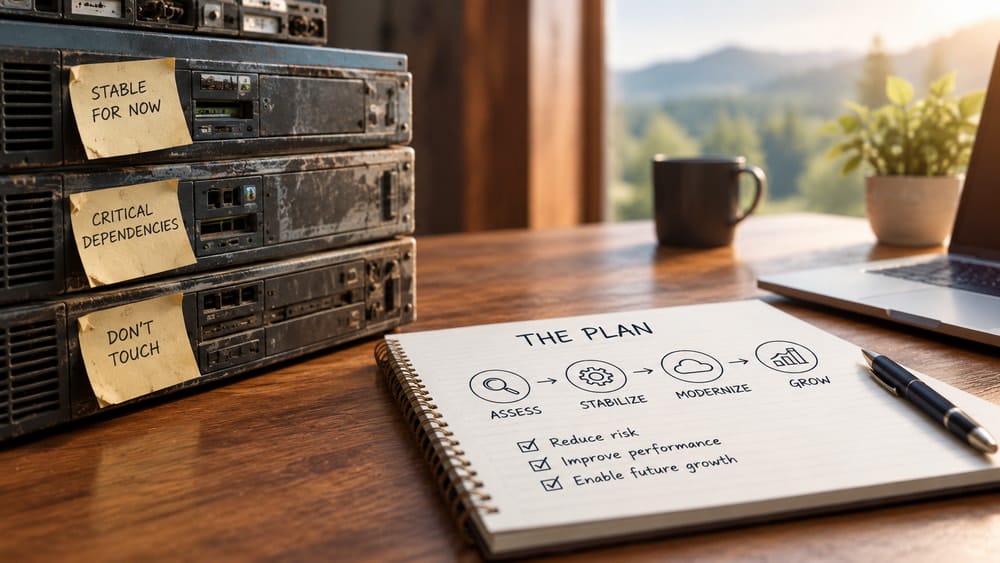
The alternative to “replace everything” is not “do nothing.” It’s having an actual plan, which usually looks like this:
First, understand what it’s actually doing.
Then, decide what to do about it. This sounds obvious, but it’s the step almost everyone skips. Before making any changes, map out what the system handles, what depends on it, and what would break if it went down. This takes time, sometimes weeks for a system that’s been running for a long time. It’s also the most valuable thing you can do because every subsequent decision depends on getting it right.
Keep it running safely while deciding what to do next.
A legacy system that’s actively maintained, patched for security, properly backed up, and monitored does not pose the same risk as one that’s been neglected. Much of the anxiety surrounding legacy systems is actually about a maintenance gap, not the systems’ age. Addressing the maintenance gap often alleviates most of the urgency.
Separate “needs to change” from “would be nice to change.”
Some parts of an old system genuinely need attention, such as a dependency with known security vulnerabilities, an unsupported database version, or a piece of infrastructure that can’t scale with current demand. Other parts are just old-looking code that works fine. Conflating the two can turn a small, necessary update into a six-month rewrite of something that didn’t need it.
Replace parts of the system in pieces, not all at once.
Where change is needed, the safer path is almost always incremental. First, extract one piece of functionality. Then, replace it and confirm that it works under real conditions. Next, move to the next piece. This approach takes longer than a big rewrite, but it’s dramatically lower risk, and the business can continue operating throughout the process.
When a full replacement is actually the right call
This isn’t a blanket argument against rewrites. Sometimes, the old system simply can’t be maintained anymore. The technology it’s built on is no longer supported. The one person who understood it is gone, and nothing was documented. No matter how it’s tuned, it can’t handle the current scale. The cost of continuing to work around its limitations has grown larger than the cost of building something new.
When these conditions are met, replacing the system is the right decision. However, this decision should be made after understanding what the system does, not in reaction to how old or unfamiliar it looks.
What I actually tell clients
When a client tells me they want to “get off” an old system, my first question isn’t about the new technology they want to switch to. Instead, I ask what the current system does, who depends on it, and what specifically is causing problems: slowness, security gaps, an inability to add a needed feature, or discomfort with unfamiliarity.
That conversation almost always changes the plan. Sometimes it confirms that a full replacement is warranted. More often, however, it turns into a much smaller and safer project involving patching, documenting, extracting one piece, and leaving the rest running exactly as it has been because it’s still doing its job.